A podcast lives or dies by audio, but the thumbnail sitting next to it in someone’s app is often what decides whether they hit play at all. Producing a distinct, on-theme visual for every single episode used to mean either reusing the same generic template every week or hiring a designer for something that only gets seen for a second. A free AI image generator changes that math completely, making a genuinely custom episode visual something you can produce in minutes, for every single release.
Dreamina, with its advanced image generation capabilities and multiple image models like Seedream 5.0 Pro, GPT Image 2, and Nano Banana, is particularly well-suited to this kind of fast, recurring creative need. Here’s how to build episode art that actually reflects what’s inside.
Why episode-specific art actually matters
A podcast feed full of identical thumbnails gives a listener nothing to go on beyond the episode title. A visual that reflects the actual topic, a true-crime episode’s shadowy tension, a comedy episode’s bright energy, gives potential listeners an instant emotional preview before they’ve read a single word of the description.
Reading an episode for its visual core
Before generating anything, it helps to boil an episode down to one visual idea rather than trying to illustrate everything discussed. A few questions worth asking:
-
What’s the single strongest emotional beat of this episode?
-
Is there one concrete image, object, or scene the conversation centers on?
-
Should the visual feel serious, playful, mysterious, or energetic?
Matching visual tone to podcast genre
Different podcast genres carry distinct visual expectations that listeners have already come to recognize:
-
Interview and conversation shows suit warm, personal, human-centered imagery
-
True crime and investigative shows suit shadow, tension, and desaturated tones
-
Comedy shows suit bright color and exaggerated, playful composition
-
News and analysis shows suit clean, structured, confident visuals
Your 3-step episode art build with Dreamina
Step 1: Write a text prompt and/or add a reference image
Navigate to Dreamina and write a detailed text prompt describing a host or guest engaged in the podcast’s central topic, styled to match your show’s established tone. You can also add a reference image of your actual host for a more personalized result.
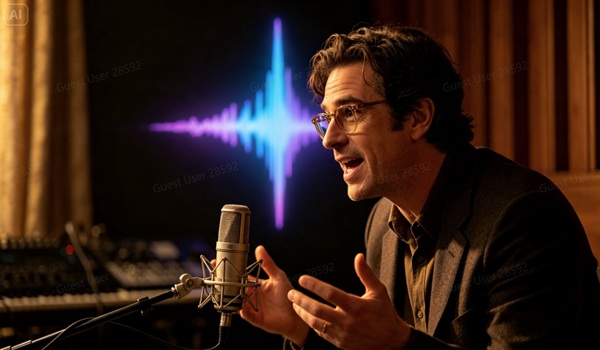
A strong sample prompt might read: A podcast host leaning forward mid-sentence at a vintage microphone, moody blue studio lighting, a faint glowing soundwave pattern rippling across the dark background, intense investigative atmosphere.
Anchoring the description in a specific pose and mood, rather than a generic “podcast thumbnail,” is what gives the visual real character.
Step 2: Adjust parameters and generate
Before generating, set your parameters. Choose your model, Image 5.0 Pro by Seedream 5.0 Pro works well for polished, editorial results, then select your aspect ratio, image size, and resolution, using a square ratio for most podcast platforms and 2K resolution to keep the art sharp across every device size. Click Dreamina’s generate icon to produce your episode visual.
Step 3: Customize and download
Once your image generates, refine it using Dreamina’s AI customization tools — inpaint to adjust specific expression or lighting details, expand to give the composition more room, remove to eliminate anything distracting, and retouch to sharpen overall mood and contrast. When it captures the episode’s real tone, click the Download icon to save it.
Designing a template that still leaves room to flex
Rather than a completely rigid template, the strongest recurring podcast art keeps a consistent frame, logo placement, color grading approach, typography style, while letting the central image itself shift entirely with each episode’s specific topic. This balance keeps the show recognizable while still giving each release its own identity.
Dreamina as a creative tool with multiple image generation models
What sets Dreamina apart from a single-purpose generator is direct access to several leading image models side by side, including Seedream 5.0 Pro, Nano Banana, and GPT Image 2, each with its own particular strengths in style, detail, and rendering approach.
-
Seedream 5.0 Pro brings strong instruction-following, precision editing, and high-resolution 2K output, ideal for polished editorial-style episode art
-
Nano Banana offers a fast, lightweight option well suited to quick iteration when you’re testing several visual directions before committing
-
GPT Image 2 adds another distinct rendering style and interpretation of prompts, giving you a genuinely different look to compare against
-
Switching between models within one workspace means never being locked into a single visual approach for your show
Having this choice built into one platform means a podcast producer can match the model to the specific mood of each episode rather than settling for whatever one engine happens to produce.
Building a visual identity across a whole season
Beyond individual episodes, keeping a consistent color palette and framing style across an entire season, while letting subject matter vary episode to episode, helps a show’s whole catalog feel like a cohesive, professionally produced body of work when browsed together.
Speeding up a weekly production workflow
For shows releasing on a tight weekly schedule, having a repeatable prompt structure- swap the subject and mood, keep the framing and color language consistent- turns what could be an hour of design work into a five-minute task, without sacrificing a genuinely custom result.
Where custom episode art earns its keep
Distinct episode visuals pay off across several practical touchpoints:
-
Podcast app thumbnails and episode listings
-
Social media clips promoting individual episodes
-
Website archives where episodes are browsed visually
-
Audiogram videos needing a strong static background image
Final thoughts
A podcast’s audio might be the whole product, but the visual sitting next to it is often the reason someone presses play in the first place, and a free AI image generator makes giving every episode that attention genuinely realistic.
With Dreamina and its advanced image generation capabilities, including the flexibility of multiple models like Seedream 5.0 Pro, Nano Banana, and GPT Image 2, each episode can get art that actually reflects what’s inside.
Read your episode for its core mood, match your visual tone deliberately, and let Dreamina help your show stand out in a crowded feed.